Local SEO (Search Engine Optimization) is an important part of digital marketing for businesses that serve customers and local or regional areas.
Optimizing your website for local searches helps you become more visible to potential customers in your area. In this comprehensive article, we cover the basics of local SEO, how it works, and which strategies you can apply to strengthen your local online presence.
Table of contents
- What is local SEO?
- Basics of local SEO
- Optimizing Google My Business
- Smart use of local keywords
- Local link building
- Online reviews and reputation management
- Frequently asked questions about local SEO
- Conclusion and next steps
What is local SEO?
Local SEO is the process of optimizing your online presence to gain more visibility in local search results on search engines like Google. This is especially important for businesses that have physical locations or serve specific geographical areas.
All these businesses can use local SEO to rank higher when users enter search queries with local intent, such as "bakery in Utrecht" or "haircut near Osdorp".
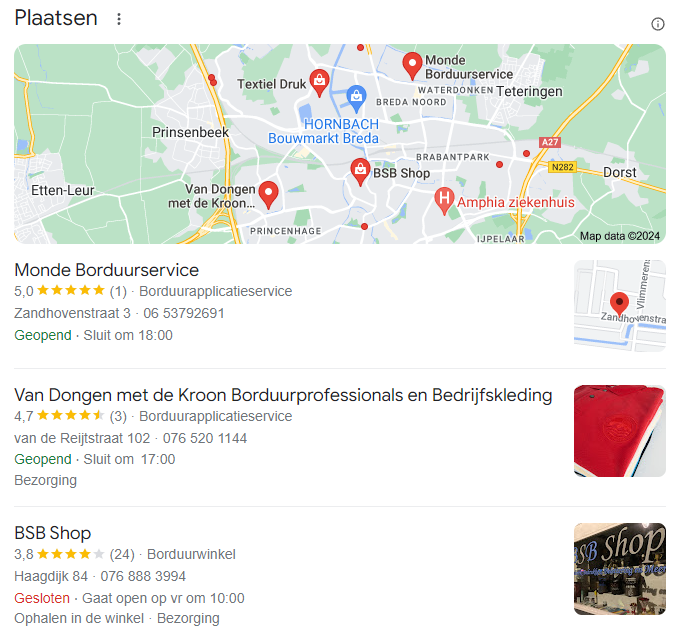
Local SEO consists of various aspects, including optimizing your Google My Business profile, obtaining local backlinks, collecting online reviews, and optimizing your website content with local keywords. By implementing these strategies, you can significantly improve your business's visibility in local search results.

Basics of local SEO
Relevance
Relevance refers to how well your business information matches what the searching user is looking for. Make sure your website and content accurately describe the products or services you offer and that this information is well optimized for local keywords. Using relevant keywords in your content, titles, and meta descriptions is essential to increase relevance.
Distance
Distance is the physical distance between the searcher and your business. Search engines use location data to display results that are closest to the user. It is important to clearly state your business address on your website and in your Google My Business profile. This helps search engines correctly identify and display your location in the search results.
Prominence
Prominence has to do with how well-known and respected your business is. This is influenced by factors such as links, articles, and directories in which your business is mentioned. Make sure your business is present online and receives positive reviews to increase your prominent status. Regular interaction with customers and involvement in local events can also contribute to your prominence.
Optimizing Google My Business
Creating and verifying Google My Business
Google My Business is a free tool that allows businesses to manage their online presence on Google, including search results and Google Maps. Here are the steps to optimize your Google My Business profile:
Step 1: Create
Create a Google My Business account and fill in all business information accurately. Make sure your business name, address, and phone number (NAP) are consistent and up to date.
Step 2: Verify
Verify your business to ensure you have full control over your business listing. This can usually be done via postcard, phone, or email.
Step 3: Update business information
Make sure your business name, address, and phone number (NAP) are consistent and up to date. Add opening hours, photos, and a detailed description of your business. This helps customers find your business and build trust in the information you provide.
Tips for optimizing your Google business page
- Add photos: Regularly add photos of your business, products, and services. This makes your profile more attractive and can increase engagement.
- Use posts: Use Google My Business posts to share updates, offers, and events. This keeps your profile active and interesting.
- Answer questions: Answer questions that customers ask on your Google My Business profile. This can help potential customers make a decision and shows that you are engaged with your customers.
Make smart use of local keywords
Keyword research
Identify keywords that are relevant to your business and location. Use tools such as Google Keyword Planner, SEMrush, and Ahrefs to find keywords that are frequently used by potential customers in your region. Analyze the competition and look for long-tail keywords that have less competition but are highly relevant.
Content optimization
Integrate these local keywords into your website content, meta tags, titles, and headers. Make sure the content is relevant and valuable to your target audience. Avoid keyword stuffing, where you overuse keywords in your content, as this can lead to penalties from search engines.
Tips for local keywords
- Use location-based page titles: Add your city or region to the titles of your pages to increase local relevance.
- Create local content: Write blog posts and articles that are specifically focused on local events, news, and topics.
- Optimize meta descriptions: Make sure your meta descriptions contain local keywords and provide a clear summary of your page.
Local link building
Local directories
Register your business in local business directories and ensure your business information is consistent across all platforms. This helps search engines associate your business with a specific location. Some popular directories are Yelp, Foursquare, and the Gouden Gids.
Local collaborations
Collaborate with local businesses and organizations to obtain backlinks. This can be done through guest blogging, local events, or other collaboration opportunities. Local backlinks are valuable because they increase the relevance and authority of your website for a specific region.
Tips for local link building
Guest blogging: Write guest blogs for local websites and request a link back to your website.
Sponsor local events: By sponsoring local events, you can often get a backlink from the event website.
Use social media: Share your content on local social media groups and pages to increase your reach and backlinks.
Online reviews and reputation management
Collecting reviews
Encourage satisfied customers to leave reviews on platforms such as Google, Yelp, and Facebook. Positive reviews can improve your ranking in local search results. Place a link to your review pages in your emails, on your website, and on social media to encourage customers to leave a review.
Reputation management
Monitor and respond to reviews to manage your online reputation. This not only shows customers that you value their feedback but also helps address any negative experiences. Thank customers for their positive reviews and offer solutions to complaints to improve customer satisfaction.
Tips for online reviews
- Automate requests: Use tools to automatically send review requests after a purchase or service.
- Respond quickly: Respond quickly and professionally to both positive and negative reviews.
- Show reviews on your website: Display positive reviews on your website to build trust with new visitors.

Frequently asked questions about local SEO
1. What is local SEO?
Local SEO is the process of optimizing your online presence to gain more visibility in local search results. This is especially important for businesses that have physical locations or serve specific geographical areas.
2. How long does it take to see results from local SEO?
Local SEO is an ongoing process and it can take several months to see significant results. It depends on the competition and the effectiveness of your optimization strategies.
3. Do I need a physical location for local SEO?
While a physical location helps, businesses without a physical location can also benefit from local SEO by specifying service areas and optimizing local content.
4. What is the difference between local SEO and traditional SEO?
Local SEO focuses specifically on search queries with local intent and optimizes for visibility in a specific geographical area. Traditional SEO focuses on broader search queries without geographical limitations.
5. How important are online reviews for local SEO?
Online reviews are very important for local SEO because they increase your visibility and credibility. Positive reviews can improve your ranking in local search results.
6. How can I find my local keywords?
Use tools such as Google Keyword Planner, SEMrush, and Ahrefs to identify keywords that are relevant to your business and location. Analyze competitors and look for long-tail keywords with local intent.
7. What are the best strategies for local link building?
The best strategies for local link building include registering with local directories, collaborating with local businesses, guest blogging, and sponsoring local events. Local backlinks increase the relevance and authority of your website for a specific region.
8. How can I optimize my Google My Business profile?
To optimize your Google My Business profile, make sure all business information is accurate and up to date. Add photos, encourage customers to leave reviews, and use Google My Business posts to share updates and offers.
9. How important is mobile optimization for local SEO?
Mobile optimization is very important for local SEO because many local searches are performed on mobile devices. Make sure your website is mobile-friendly and loads quickly to provide a better user experience.
10. What are featured snippets and how can they help my local SEO?
Featured snippets are short summaries of answers to search queries that appear at the top of search results. They can increase your visibility and drive more traffic to your website. Optimize your content with clear and concise answers to frequently asked questions to increase your chances of appearing in featured snippets.
Get started with your local SEO, or let us help you!
Using local SEO effectively can have a huge impact on your business's visibility. Start today with the things we've discussed here, such as optimizing your Google My Business profile, collecting local backlinks, and managing online reviews.
Do you need help setting up or improving your local SEO strategy? Our team of experts is ready to support you. Contact us and find out how we can help you strengthen your online presence and attract more local customers.